Veteran Pathfinder
About Project
Title
Veteran Pathfinder
A crowdsourcing platform.
Client/Project Type
Volunteer Project
Role
I was the UX Designer throughout the project cycle, from planning and requirements gathering to strategy, wifreframing, design, and publishing.
Skills
Best in Practice Research, Discovery Research, Interviews, Persona, Survey, Information Architecture, Sitemaps, User Flows, Wireframes, User Testing, UI Design
Problem Statement
Veterans face significant challenges after service like isolation, housing, finance, and mental health, these problems too often end with regrettable outcomes.
Research
Research and interviews showed that isolation and lack of information were major causes of a number of problems.
Solution
By matching the need for community and to serve with the lack of information reaching veterans, a crowdsourcing platform by and for veterans provided some powerful results.
Impact
Problem Resolution: 129% Not only did users find the solutions they were looking for, many found solutions to problems they hadn't thought of.
Recommendation 86% (NPS) of users stated they would recommend the platform to other veterans.
71% (CSAT) of users stated they were satisfied with their ability to find solutions on the platform.
Learn More
Discovery
User Interviews & User Research
While there was a lack of funding, there was no lack of enthusiasm. The problems veterans faced had to be understood from the national scale down to ground level.
Individual Level
Individual Level
Need
To understand how veterans are finding solutions on their own?
What works, what doesn’t and why?
Solution
Veteran Interviews
7 veterans were interviewed for 60 minutes.
Insights Gained
-
Veterans suffer from a loss of:
Community
Service & Mission
Achievement & Recognition
-
Veterans often have family, fellow veterans, or friends as a support system; this support system often faces the same challenges, and may be part of a solution.
-
Veterans know a wealth of information about solutions for the challenges they face.
Community Level
Community Level
Need
To understand how communities of veterans are working together to face problems, how well they work.
Solution
Social Media Platforms
Online platforms and their veteran communities were examined.
Insights Gained
Social media offers responses to some problems, but suffers from:
-
Incorrect information
-
Unorganized Information
-
Outdated Information
National Level
National Level
Need
To understand major trends in the veteran community on a national scale, through in-depth research spanning decades.
Solution
Governmental Research Documents
Research from the Veterans Administration, and other research organizations were examined.
Insights Gained
-
Causes of problems may have several sources, that can multiply if not treated: physical, emotional, financial, psychological.
-
There is no single source of expertise to the varied problems the veteran community faces.
-
There are several good resources; and several bad resources, it is a challenge to weed them out.
Define
Personas & Empathy Maps
To guide design, based on user needs, the interview and Veteran’s Administration research data entered into AI and developed into personas and empathy maps, which gave me key insights.
Allen
The Helper
Age 52
Retired infantryman, now volunteers at a local Veterans' Outreach center.
"I'm looking for the same fellowship I had in my first unit."
Challenges
Isolation after leaving service.
Lacks a sense of community.
Struggles with adjusting to civilian life.
Core Needs
Opportunities for meaningful volunteer
Sense of belonging and purpose.
Connection with others that have had similar experiences.
Behaviors
Actively seeks out volunteer opportunities at local veterans' centers.
Frequently looks for ways to connect with people he served with.
Participates in online veteran forums.
Attitudes
Willing to help others but feels uncertain about how to contribute.
Eager to help veterans avoid the trial-and-error path he had to endur
Wants to feel valued in his post-service life.
Empathy Map
Say
"I just want to feel like I’m helping, but I’m not sure where I fit in."
"I want to know that when I'm volunteering, I’m contributing something of value."
Think
"Veterans need to lookout for each-other."
"I miss the camaraderie in the service."
Do
Volunteers at outreach centers, joins veteran social groups, and looks for local events to get involved in.
Seeks out online veteran communities to exchange experiences.
Feel
Lonely and unsure about how to integrate back into civilian life.
Hopeful that he can make a difference, but unsure where to begin.
Insights
Isolated, and suffering from loss of community.
Actively seeking volunteer opportunities to be of service to veterans.
Has 20 years of knowledge on the challenges veterans face.
Diana
The Rebuilder
Age 37
Army veteran who struggles with mental health challenges.
"I need support from others who understand what I’ve gone through."
Challenges
Struggles with PTSD, but hesitates seeking help due to privacy concerns.
Veteran resources are scattered, and points of contact are hard to find.
Core Needs
Access to mental health support.
Respect for privacy and autonomy while healing.
To support others with her strength and get support from others who understand her.
Behaviors
Tends to isolate when feeling overwhelmed.
Willing to try new therapies if they are recommended by peers.
Participates only in small and trusted communities.
Attitudes
Desires privacy and respect.
Wants to feel empowered in her healing process.
Wants to be part of something bigger, but on her terms.
Empathy Map
Say
"I need support but don’t want to keep explaining my struggles."
"I want to heal without always having to revisit the past."
Think
"I’m not sure how to heal while still maintaining my privacy."
"I don’t want to ever be judged for seeking help."
Do
Seeks mental health support, looks for online forums, and cautiously participates in local veteran groups.
Works to find new coping mechanisms that respect her privacy.
Feel
Fearful of being misunderstood.
Reluctant to trust others but desires a supportive community.
Insights
Will accept support from a small, understanding community.
Challenged by the fragmented nature of veterans support systems.
Requires privacy and recognition for what she has survived.
Jamal
The Seeker
Age 25
Navy veteran, adjusting and exploring career options.
"I have developed as a leader in the Navy, how can I get the corporate world to see it."
Challenges
Struggles to find a stable career after
military service.
Financial instability and debt.
Learning how to establish himself in the corporate world.
Core Needs
To have his career benefit from years of military experience and training.
Stability in long-term career prospects.
Mentorship from those who’ve successfully transitioned.
Behaviors
Seeks advice from peers who have already transitioned.
Frequently searches for career-focused online groups.
Navigating the bureaucracy in the veteran assistance system.
Attitudes
Determined to make the most of his post-service life.
Feels uncertain about the future but willing to explore.
Worries about financial stability.
Empathy Map
Say
"I don’t have all the answers yet, but I’m not giving up."
"Trying to navigate this system is exhausting, but I need to keep pushing."
Think
"I know I am not the only one going through this."
"I need a clear direction; I feel lost sometimes."
Do
Participates in online job and education-focused veteran groups.
Works to find new coping mechanisms that respect her privacy.
Tries posting on Facebook groups.
Seeks mentorship and attends career fairs aimed at veterans.
Feel
Determined, but uncertain about his future path.
Frustrated with the multiple challenges of transitioning.
Insights
Seeking mentorship and direction from the veteran community.
Motivated, willing to devote large amounts of effort.
Active in the online community, but the online community has failed them.
Peter
The Fighter
Age 44
Marine Corps veteran who sustained injuries during service.
"I need a hand up, not a hand out."
Challenges
Chronic injuries from combat.
Difficulty finding accessible work due to physical limitations.
Feeling misunderstood by others who have not experienced similar trauma.
Core Needs
Connection with others who have experienced similar challenges.
Respect for physical limitations.
Find a community that values his knowledge and experience.
Behaviors
Regularly seeks medical advice for injury management.
Actively advocates for fellow veterans’ healthcare.
Joins online support groups for disabled veterans.
Attitudes
Reluctant to ask for help, but appreciates it when it is offered.
Passionate about helping others in similar situations.
Believes in personal strength and self-reliance, but recognizes the importance of community.
Empathy Map
Say
"Getting benefits is a struggle, but life is a struggle."
"I’ll fight for what I deserve, even if it’s hard, even if it takes time."
Think
"I’m strong enough to handle this, but I need support from those who understand what I have gone through. "
"I don’t want to be seen as broken."
Do
Fights for better healthcare benefits for veterans.
Participates in adaptive sports and connects with other veterans online.
Feel
Empowered but also isolated in dealing with physical and mental scars.
Motivated to help but feels unsupported at times.
Energized by helping others.
Insights
Seeking a community that offers recognition of his knowledge.
Passionate about helping others.
Active in the veteran community.
Common Themes in the Personas
After military service veterans suffered from loss of:
- Community
- Achievement
- Recognition
- Service
Insights into Action
-
The number of challenges was too large for me to take on with a limited budget.
-
The only group large enough and with the expertise to take on the challenges was the veteran community; I just needed to create a platform that made it possible.
-
A crowdsourced platform would also provide veterans with the opportunity to fulfill their needs of community, achievement, recognition, and service.
Key Crowdsourcing Factors
-
User-Driven Veterans/supporters can target real-world issues, propose solutions, and comment on ideas.
-
Tailored Solutions Crowdsourced platforms can generate specific, usable solutions to people’s unique needs, from people who understand.
-
Privacy Veterans can maintain anonymity while accessing valuable information or seeking advice.
-
Community Building The platform can foster a sense of belonging, by providing a safe environment for veterans to share resources, experiences.
-
Comprehensive Support By including veterans and supporters (e.g., family members, healthcare providers), the platform can provide comprehensive solutions for veterans.
IA
Information Architecture (IA) & User Flow
Testing's First Lesson
The original prototype tested well for basic writing, but user feedback made it clear I needed to redesign the platform so that it would promote community communication.
Publishing Focused Architecture
I assumed that as a content platform, my best course would be to design it after established CMS applications. I studied WordPress, Drupal, and Joomla, where users login and can immediately start publishing. User feedback made me rethink the architecture.
Communication Focused Architecture
Communication and community need to be the backbone of the platform. I redesign the architecture by moving messages from a separate page to the home page, giving users immediate access to the community.
Redesigned Prototypes
The standard home page for a publishing platform won’t cut it.
Users wanted to get and send updates and ideas; as soon as they logged in, 3 designs were tested.
(The center design performed best.)
Home Page as Communication Hub
-
Menu of all messages, organized by tag.
-
View of all messages from selected category.
-
Community Chat allows a constant exchange of ideas.
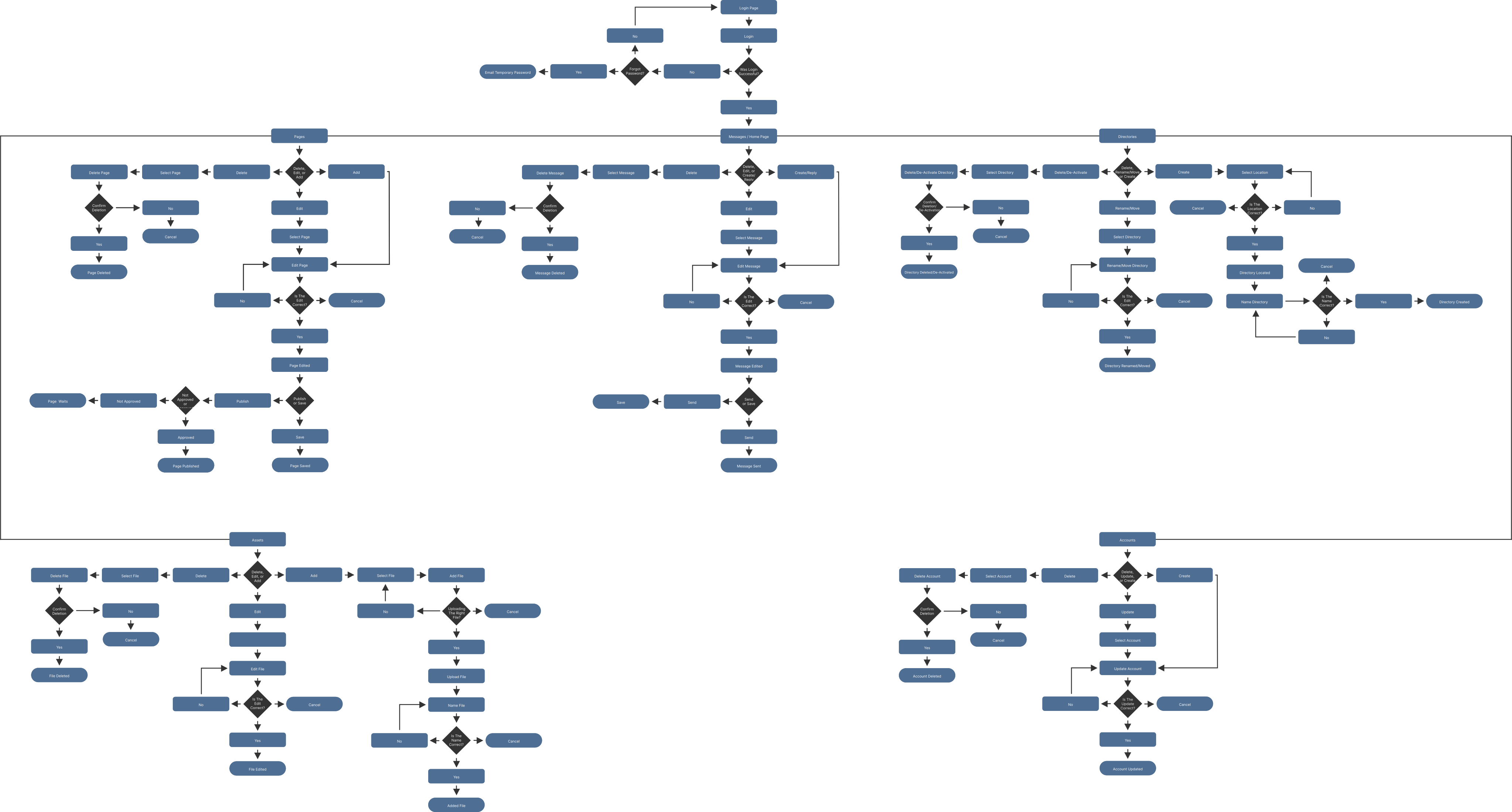
Now that I understood the best solution to fulfill the user's need would be a crowdsourcing platform, the user flow and site map had to be worked out so that wireframes and prototypes could be generated and tested.
User Flows
Design
Wireframes & Visual Design
Wireframes
Visual Design
Testing
Usability Testing & Iteration
Testing's Second Lesson
Again, the early prototype I created was designed to be efficient at writing, and it tested well, however users let me know they needed a design that made it easier to collaborate, not just write.
The Question That Launched a Workshop:
"What do you like/dislike about the writing process?"
5 of the 7 participants took part in our workshop to discuss what they needed to produce their best work.
Below: Users were asked what they needed before, during, and after they created content.
Two Main Themes From Our Workshop:
-
Collaboration
Users wanted their work to be proofread.
-
Validation
Users wanted to know if their work helped veterans.
Center Box
To provide the environment the user needed, I had to rethink the workflow and redesign the platform.
Standard Writing Flow
The standard writing flow would not allow the required community collaboration.
Collaborative Writing Flow
The first prototype test let me know that users wanted a platform that allowed them to discuss ideas for content.
The second let me know I needed to allow users to have support through every step of producing content.
- Every page has a link to the community chat (Pathfinder's Square) that acts as a place where users can exchange ideas for pages.
- Users can assign writing teams to their pages.
- Writing teams can provide feedback and suggest page edits.
User Need 1: Collaborative Writing Through UI
Writing Team Feedback
-
A writing team can be created to act as co-authors.
-
Co-authors can comment and make suggestions.
-
Co-authors can have their suggested edits displayed in content to be accepted or rejected.
User Need 2: Validation Through UI
Problem: Motivation
Solution: Gamification
Four needs voiced in user interviews with veterans were regaining
Community,
Achievement,
Recognition,
and
Service;
careful thought was put into what statistics would be best to present to them and how. Gamification with points based on the quality and quantity of pages produced allows an alignment between user and application goals.
Header & Identity
When a veteran leaves service, they lose the uniform; the uniform displays the unit, name, and rank of the service member.
The header has analogous design features: the Veteran Pathfinder crest, name, rank, and points, providing a sense of place and accomplishment as the veteran’s uniform did.
-
The Veteran Pathfinder crest inspires identity as a member of a community, as a military patch would.
-
The user's rank icon provides recognition of service. Users' ranks are based on the quality and quantity of their pages.
-
To encourage performance, the quality and quantity of their pages are displayed as a sign of accomplishment and progress towards their next rank.
Pages & Points
-
To show what is valued, the average page rank is given high visibility.
-
As a matter of pride and reference, the user’s pages are listed.
-
Ratings are listed so that users can improve lower-rated pages.
Motivation & Improvement
-
To motivate users to keep publishing quality content, they are encouraged to earn their next rank.
-
To ensure users know that their work has had an impact and been of service, the number of visitors to their pages and the amount of time spent on them are posted.
-
The goal is to improve the quality of content; trends of quality over time give users an easy reference point.
Community & Involvement
-
To support a sense of community, former writing team members are displayed.
-
Fostering collaboration is vital; users are given recognition for how much service they have been to their fellow users by displaying both the pages and users that benefited from their efforts.
-
What is next? To keep users involved, posts that are in progress are listed so that they can join in.
Impact
Evaluation & Metrics
Measuring the impact of a platform with limited resources is challenging, but it can be done by focusing on qualitative insights, user feedback, and demonstrating clear, actionable outcomes.
Success Measured
To prove the success of the platform, I collected both quantitative and qualitative data.
Key indicators included:
-
High satisfaction and positive testimonials from users.
-
Clear behavioral patterns indicating continued engagement and use.
-
Concrete outcomes, such as participants resolving critical issues like housing or accessing mental health resources.
-
Identification of successful features and areas for improvement.
86%
Recommendation
Net Promoter Score (NPS)
86% of users stated they would recommend the platform to other veterans.
57%
Behavioral Metrics
Engagement Tracking
57% users used the platform to find their own solutions, after taking part in testing.
129%
Problem Resolution
Real World Impact
Not only did users find the solutions they were looking for, many found solutions to problems they had not thought of.
"I could ask questions without getting judged."
User Feedback
Feature Success
The community chat feature proved overwhelmingly popular. It proved to be the heart of the platform.
71%
Satisfaction
CSAT Customer Satisfaction Score
71% of users stated they were satisfied with their ability to find solutions on the platform.
5/7
Behavioral Changes
Changing Outlook
Most users stated feeling increased confidence, less alone, and more in control of their post-military lives.
Next Steps
Continuous Improvement
Users were positive about the platform and expressed favorably about the variety of solutions they found, and they had ideas for improvement.
Users wanted live video chats; others liked the video chat concept but wanted an inconspicuous option for remaining anonymous.
With more funding and time, there are several improvements that can be made to the platform.
Covering Veteran's Needs
Near Term
Need
Ensure users are writing on topics the veteran community needs.
How
Provide motivation
Method
Gamification
Details
Employing gamification to drive users to write on subjects we lacked information on. For example, we don’t have many pages devoted to rehabilitation; if we had a rehabilitation badge, users might produce pages on the subject to earn the badges, silver, and gold.
Congratulations!
Silver Iron Will Badge
You have earned the Silver Iron Will Badge. Your pages guiding veterans through rehabilitation have been viewed 2,000 times and have an average of 4.00 points.
Congratulations!
Gold Iron Will Badge
You have earned the Gold Iron Will Badge. Your pages guiding veterans through rehabilitation have been viewed 4,000 times and have an average of 4.50 points.
Making it Easier to Contribute
Far Term
Need
Remove pain-points in the contributor’s user journey.
How
Removing the toughest parts of writing.
Method
Artificial Intelligence
Details
1 Expertise & Interest
A Navy veteran, Alonzo, is interested in helping the veteran community enters his areas of experience.
2 AI: Assigning Talent
The Veteran Pathfinder AI has noticed a Google Alert on TBI issues and an increased number of searches on the platform.
Knowing Alonzo has managed TBI, the AI arranges a time for him and fellow Pathfinders to write a page on TBI.
3 Writing Team & AI
3 Writing Team & AI
The Veteran Pathfinder AI has written an outline of topics that would be most beneficial to cover in regard to TBI.
Alonzo meets with the TBI writing team to discuss the best treatments for and how to manage TBI, while the Veteran Pathfinder AI writes the page that can be read by visitors and used as data for the platform's AI to answer users' questions.
Lessons
Key Takeaways
1. Designing for VS Designing with
Lesson: While it's common to talk about designing for underserved groups like veterans, I learned the deeper value of designing with them.
My early assumptions, even with the best of intentions, missed key nuances of their needs.
Implementation Insight:
I had to shift from a standard interview to co-creation workshops, giving veterans not just a voice but a role in shaping the features and priorities, making Veteran Pathfinder a more collaborative platform.
2. Validation Loops Build Momentum
Lesson: Participants wanted to know that their contributions mattered. Lack of follow-up made the platform feel like a black hole, and participation suffered.
Implementation Insight: Gamification, using real world data in a dashboard not only let users know that had an impact, but help them become more effective participants.
3. Designer & Developer
Lesson: Being responsible for design and development was a great learning experience. Combining the knowledge of the user’s needs with the capabilities of programming results in better products.
Implementation Insight: I’m as guilty of this as other designers, in the past I simply asked engineering teams if they could code a feature.
By having conversations with engineering teams about the over-all goals of a project, along with the user’s needs I give them the opportunity to generate options, and shape projects, resulting in better user experiences.
What This Means for You
This project demonstrates not only my ability to design and deliver impactful digital products, but also my strength in bridging strategy, design, and development:
-
Product Mindset
I align user needs and business goals with design solutions, ensuring your product delivers real-world impact.
-
Full Lifecycle Experience
From research to development, I can collaborate seamlessly across departments and contribute value at every stage.
-
Hands-on Approach
You can rely on me to own complex problems, build from zero, and ship polished, responsive, user-centered products.
Contact Me
Case Studies